Don’t Wait for the Failure: Multiplying Deployment Data via Simulation
By Szymon Trochimiak, Senior ML Research Engineer
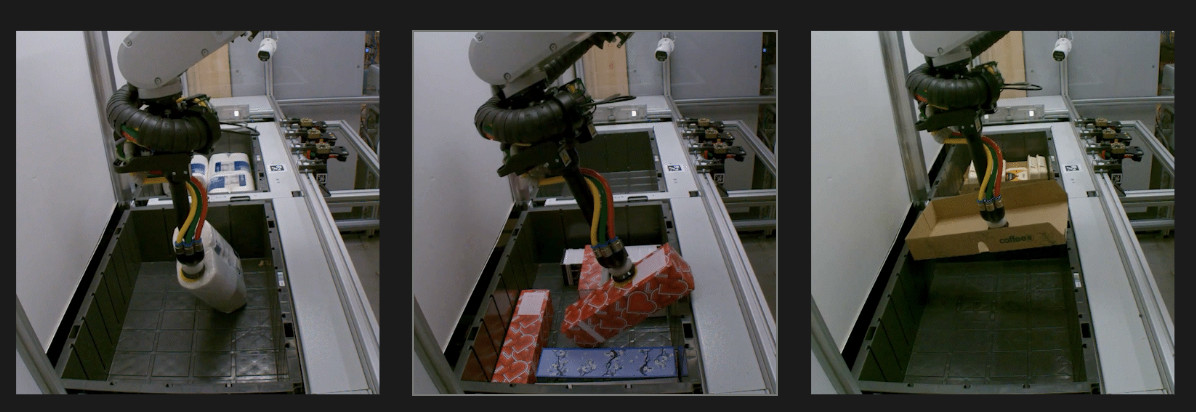
For physical AI, simulation and real-world are not competing but complementary data sources. Sometimes an item opens while the robot is carrying it. If the robot can see a disassembled item, it can stop and ask for help. That is the job of Live Anomaly Detection (LAD, for short). The hard part is learning about them because the robot rarely encounters anomalies (that’s why they are anomalies). Below is how we succeeded in using synthetic data to teach LAD about failures production rarely shows us.
What LAD does
Live Anomaly Detection is a vision system that watches camera feeds throughout every pick, at 15 frames per second. For each frame, it decides whether we encountered an anomaly, i.e., a disassembled item, or not. If, for a given attempt, the model returns positive (i.e., anomaly detected) for three consecutive frames, the robot pauses, and a remote operator takes a look.
LAD is judged on two numbers:
False negative rate (FNR) is the share of disassembled boxes we don’t detect;
False positive rate (FPR) is the share of good picks it wrongly stops.
A miss can put medication with missing content in a customer’s parcel. A false alert costs an operator’s attention and seconds of cycle time on a station built for hundreds of picks per hour. At high volume those seconds add up, so we want to minimize both FPR and FNR.
Why data is the hard part
Robots record every pick, so video is plentiful. Useful labels are not. Four things make this problem difficult:
Positives are rare. Around 1% prevalence. Our first held-out test set had 37 positive attempts against 2,604 clean ones. With so few positives, one extra detection moves the true positive rate by almost three points. That makes it hard to measure progress, and even harder to learn from.
Labels are expensive. Tagging box state frame by frame is slow. Most of production videos are never labeled, and none of the cases we most need – boxes on the verge of opening – are easy to find.
The lab does not look like production. We recreated about 1,600 disassembling picks in our lab on prepared items. But lab cells are visually significantly different from production. So adding lab data didn’t reliably improve production metrics. The model didn’t generalize between environments.
The class boundaries are subtle. “Partially open” and “fully open” differ by a few degrees of flap angle. Annotators disagree exactly where the model most needs a clean signal.
Why we render instead of generate
The obvious “shortcut” would be a generative image model, but it fails on exactly the things we need. Describing in words where “partially open” ends and “fully open” begins is not reliable. It is also hard to generate the same box at 20 and 25 degrees of opening, which is the kind of contrastive pair that teaches a boundary. A label read from a prompt is a guess. A label read from geometry is exact.
So we modeled a parametric pharmaceutical folding carton in Blender. Every property that matters for the label is an explicit parameter:
Opening from 0° (shut) to 180° (fully open), plus side splay and tuck-flap curl.
Contents protrusion – blister packs and leaflets lifting out, within what the opening physically allows.
Surface wear – undulation, seams, creases and roughness.
Artwork and colour, camera calibration jitter and the grasp.
How do we go from a spec to a rendered and classified box:
The spec gives a distribution for each parameter.
The spec is sampled into one scene per box.
The scenes are rendered with Blender Cycles on GPUs.
Rendering is split into resumable shards, one per GPU. Each render takes about 20 seconds.
The class then follows from the geometry:
Above 23.5° of opening, the box counts as fully open (counts as disassembled item);
Between 2.5° and 23.5° counts as partially open (does not count as disassembled).
Fig. 1: Rendered cartons across the four box states, as the wrist camera sees them.
How a render becomes a production frame
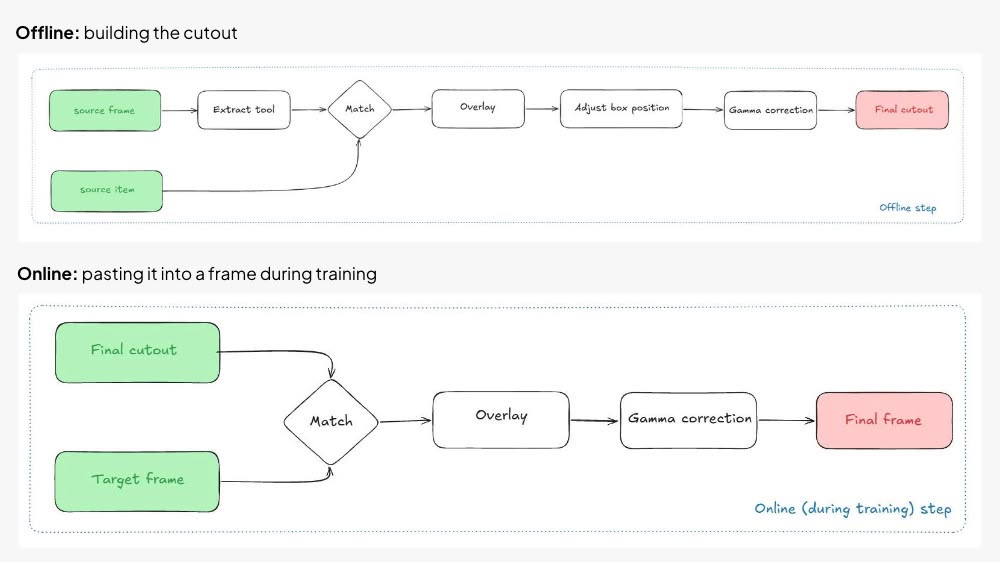
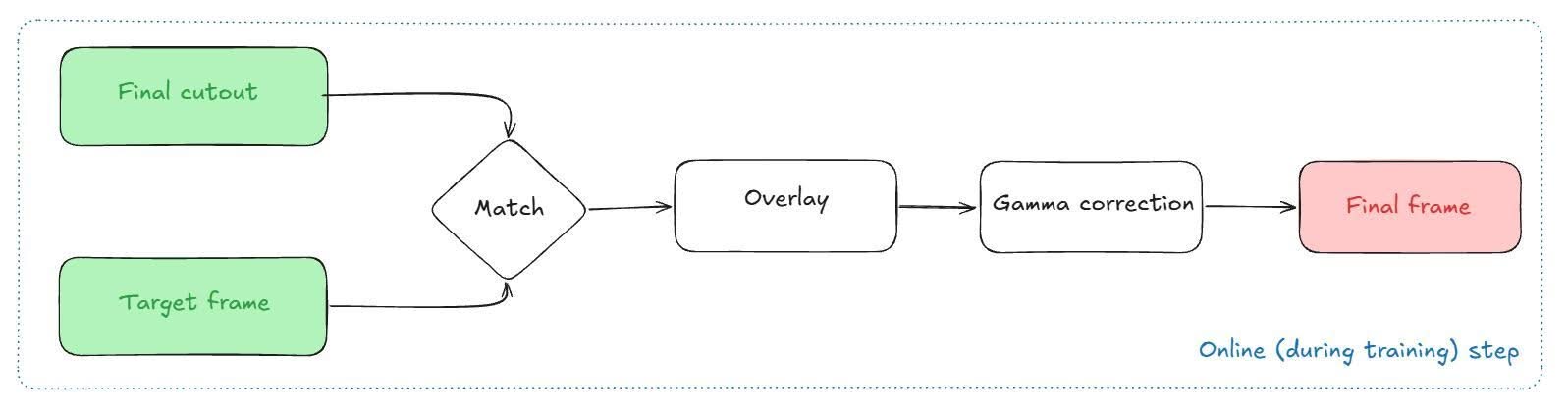
A rendered carton on a grey background won’t teach a model much about a real production environment. So we put it into real frames, in two stages. The offline stage builds a cutout – a real gripper holding a rendered box – once, and stores it. The online stage pastes that cutout into a real frame every time training draws it, so the same box shows up in many scenes.
Offline: building the cutout
Fig. 2: The offline step, from a source frame and a rendered item to a stored cutout.
1. Source frame. A real frame, from production or the lab, in which the robot is holding an item. Suction pressure tells us whether the gripper holds something, so these frames can be picked automatically.
2. Extract the tool. Our in-house segmentation model finds the gripper and the held item. We keep the gripper and discard everything else, including the real item. We also save the brightness of the item and of the whole frame for the corrections later on.
3. Source item. A rendered carton. Its class is set by the render’s geometry.
4. Match and overlay. We pair the gripper with a render made for the same camera and tool, and lay the real gripper over the rendered carton. If the gripper doesn’t overlap the box, we shift the box until it does.
5. Gamma correction. Renders come out bright and sharp. We match the carton’s brightness to the brightness of the real item it replaces, and store the result as the final cutout.
Online: pasting it into a frame during training
Fig. 3: The online step, run during training, which pastes a stored cutout onto a new frame each time it is drawn.
7. Final cutout and target frame. Training loads a cutout and a real frame in which the robot holds nothing, from the same robot, camera and tool. Like the source frames, these can be picked by suction signal.
8. Overlay and gamma correction. The cutout is pasted at its own position. The wrist camera is rigidly mounted to the tool, so the pasted gripper covers almost all of the target’s own gripper and no inpainting is needed. Finally, we match the brightness of the whole source frame to the whole target frame, which gives the frame used in training.
Each rendered box is reused with about eight different real grippers, and each cutout lands on a new target frame every time it is drawn. Synthetic frames make up roughly a quarter of every training batch.
What we learned the hard way
The rendering was the straightforward part. Most of the lessons came from evaluation and plumbing:
Route every class through the same generator. If only the disassembled boxes are pasted, the model will learn to detect the pasting artifacts, not the actual state of boxes. Closed boxes and plain holding frames go through exactly the same pipeline, so being synthetic says nothing about the class.
Most surprises were pipeline, not rendering. At one point our renders seemed to sit on the wrong side of the gripper. The render rig was fine. Two wrist cameras shared a file name, and left and right video had been silently mixed.
Where it stands
We extended our test set to all labeled attempts from two production stations, around 12,000 videos, and removed both stations from training entirely. On it, training with rendered cartons significantly improved generalisation from lab to production: we reduced FNR 2.07times at FPR=1%. The practical consequence: we can now train on production footage without waiting for production to break enough boxes.
The next generation of renders targets the failures still missing from the pack: torn and deformed boxes, wobble and the motion blur it causes, boxes held by a flap or the bottom face, and more varied contents.
What does this mean for physical AI, simulation, and real-world data?
In both digital and physical applications, it’s tempting to treat synthetic data as a full replacement for real-world experience. The simulator-first approach has led to impressive results in robot locomotion, racing, and even soccer. But it relies on a tight loop back to real-world deployment to evaluate and to adapt the simulator.
Our work at Nomagic follows the same path. In this project, we started from real data: the gripper, the background and the lighting all come from production. Simulation becomes a data multiplier and we render artificial parts and variants extending real data with edge-case-specific information. To iterate on augmentation, we again need to close the loop to real-world deployment.
This work directly connects to the mastery-first path we described in A Humble Pivot for Physical AI and The Last Few Percent. Robot deployment and reliable autonomy depend on efficiently solving rare and sporadic problems only appearing in production. Simulation does not replace our deployment flywheel but it accelerates it. When we encounter new edge cases, we don’t have to wait for them to happen often enough to learn; instead, we let simulation multiply our data stream.
If you want to build mastery-first physical AI and accelerate the impact on simulation on deployment: We’re hiring! Link to our career page
By Michał Grzejdziak-Zdziarski, Senior Machine Learning Manager; Markus Wulfmeier, Chief Scientist Making sure every order that ships to a customer is correct sounds like a solved problem until you look…
By Markus Wulfmeier, Chief Scientist In our pursuit of general-purpose physical AI, our field keeps looking to the horizon: designing massive simulations, scraping internet video, curating ever-larger teleoperation datasets. Yet…
By Filip Grządkowski, VP Engineering In the race to automate the physical world, not all intelligence is created equal. For years, robotics has been driven by breakthroughs in AI labs:…